 English
Sync car auction data: an hourly import that doesn't break
How to sync car auction data from Copart and IAAI: initial import, hourly /cars and /archived-lots updates, upserts by lot, retries and monitoring, in Python.
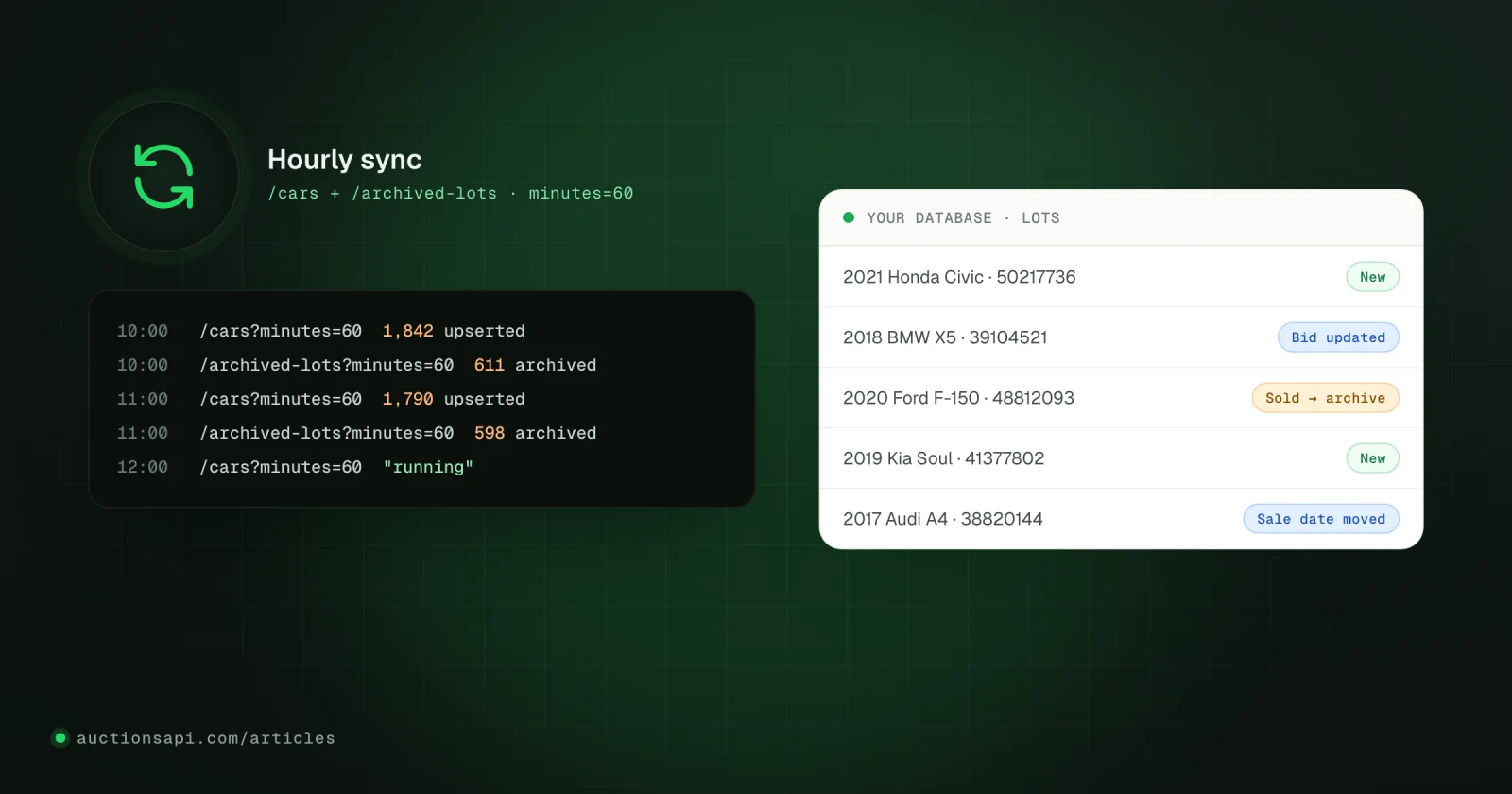
To sync car auction data without gaps, run one job every hour that does two things in order: fetch every vehicle that changed in the last hour from /cars?minutes=60 and upsert it, then fetch every lot that left the auction in the same window from /archived-lots?minutes=60 and mark those lots as archived. Before the first hourly run you import the whole active inventory once by paging through /cars.
The requests are the easy part. Imports break on the details around them: a window that does not overlap the previous run, an upsert keyed on the VIN, a sold lot that takes the whole vehicle down with it, a retry loop that hammers a revoked key, a checkpoint saved after only one of the two feeds.
This tutorial builds the job step by step in Python against the documented Copart and IAAI endpoints, with SQLite so you can run it as is. Swap the SQL for PostgreSQL or MySQL; the logic stays the same.
Key takeaways
- One hourly job reads two feeds: changed vehicles from /cars and lots that left the auction from /archived-lots.
- Use the lot id as the key for lots and the vehicle id for vehicles; a VIN and a lot number are not unique on their own.
- Archive the lot, never the whole vehicle: the same car can still have an active lot on the other auction.
- Overlap the time windows, make every write idempotent and move the checkpoint only when both feeds have finished.
- Retry 429, 5xx and timeouts with backoff; stop and alert on 400, 401 and 403.
How to sync car auction data: the shape of the job
Three requests make up the whole loop. The first runs once (and again whenever you reconcile); the other two run every hour, in the same job, one after the other.
| Step | Request | Page size | What you do with it |
|---|---|---|---|
| Initial import | GET /cars | 50 by default; up to 1000 on Unlimited | Upsert every vehicle and its active lots |
| Hourly update | GET /cars?minutes=60 | Same as above | Upsert vehicles whose record or any active lot changed |
| Hourly archive | GET /archived-lots?minutes=60 | 100 by default; up to 1000 on Unlimited | Mark those lots archived, store the final bid |
- 1Take a lockOnly one run per database. A second run exits at once.
- 2Changed vehicles/cars with minutes = time since last run + overlap. Upsert page by page.
- 3Archived lots/archived-lots over the same window. Archive by lot id.
- 4Save checkpointStore the start time of this run, only after both feeds finished.
- 5Reconcile weeklyA full pass of /cars catches anything the rolling windows missed.
Every request is a GET with your key in the x-api-key header and no body. Every authenticated request counts toward the plan allowance, including requests that end in an error, so validate parameters before you send them and leave unused ones out entirely: an empty domain_id= can be rejected.
A small client with retries and pagination
Start with the part everything else uses: one HTTP session, a request function that knows which failures are worth retrying, and a generator that walks pages. The collections from /cars and /archived-lots come in a data array with links and meta; you follow until links.next is null.
Two choices in this code are deliberate. The generator does not follow the next URL; it rebuilds the request with the same filters and only increments page. That keeps your filters identical on every page and means your key is never sent anywhere except the API host. And simple_paginate=1 skips the total count, which makes deep pages faster; do not build logic on meta.total anyway.
Page sizes per plan
/cars returns 50 vehicles per request by default on every plan. Demo and Small keys are capped at 50; Unlimited accepts per_page=1000. /archived-lots defaults to 100, with the same 1000 ceiling on Unlimited. A per_page above your plan's limit is not quietly reduced: the request fails with 400. Keep both sizes in configuration, which is what CARS_PER_PAGE and ARCHIVE_PER_PAGE are for in the last part of the script. The pagination page lists the sizes of every endpoint.
Upsert by lot, not by VIN
A vehicle is the physical car; a lot is one appearance of that car at an auction. A 2018 Honda CR-V can fail to sell at Copart, come back at IAAI a fortnight later and sell there, which gives one vehicle and two lots. The same lot number can also exist on both auctions. So:
- Key vehicles on
vehicle.id. - Key lots on
lot.id. It is also thelot_idthat the archive feed refers to, so it is your join key. - Add a unique index on (
domain,lot): the auction plus its own lot number is what people search for. - Never upsert on the VIN alone. You would merge separate sales into one row and lose history.
The vehicle upsert stores the vehicle without its lots, then writes each lot. Note the WHERE lots.archived = 0 on the lot update: inventory changes while you page, so a page fetched a minute before a lot was archived must not flip it back to active.
One more detail from the API contract: a domain_id filter selects vehicles that have a lot on that auction, but lots can still contain a lot from the other one. That is why the code stores lot.domain.name for every lot instead of assuming the auction you asked for. SQLite and PostgreSQL both support this ON CONFLICT … DO UPDATE syntax; see the SQLite upsert documentation for the details of excluded.
The hourly update with /cars?minutes=60
minutes=N returns vehicles whose record or any active lot changed in the last N minutes. It is a rolling lookback measured from the moment the API receives the request, not a cursor. If your job runs at 10:00 and again at 11:03, a fixed minutes=60 misses three minutes of changes. Compute the window from your last successful run instead and add an overlap:
The API accepts 1 to 4320 minutes (72 hours); anything larger returns 400. After a longer outage the incremental feed cannot cover the gap, so run a full import and a reconcile instead of trusting it. Polling more often than every 10 to 15 minutes brings almost nothing new, and hourly is what most catalogs need.
Retiring sold lots with /archived-lots
/archived-lots?minutes=W lists lots that left the active inventory in the window: sold, not sold, or removed. Each event carries lot_id, car_id, the VIN, the lot number, the auction, a status and, in the current shape, bid, buy_now, sale_date and final_bid as { value, updated_at } objects. Some older accounts receive a legacy shape where bid is a plain number; the code above detects which one it got and never treats a legacy bid as a confirmed sale price.
Three rules for this step:
- Archive by lot id. Set
archived = 1on that lot only. If the vehicle has another active lot, it stays in your catalog. - Do not delete. An archived lot with a final bid is the history that VIN pages and price research run on. Hide it from the active catalog with a filter, keep the row.
- Label it honestly. Show "Sold for" only when
final_bidexists. An archived lot without one ended without a recorded final price; call it "Ended", not "Sold".
Run the archive feed after /cars, and widen its window by the time the first feed took. On a first import that pages through the whole inventory, this is what catches lots that sold while the import was still running.
The run function and the checkpoint
The checkpoint is the start time of the last run that completed both feeds. Saving the start time, not the end, means the next window covers everything that changed while this run was busy. Each page is committed in its own transaction, so a crash halfway leaves the finished pages in place; the next run simply replays the window, and the idempotent upserts make the replay harmless.
Schedule it under a lock so two runs never write at the same time. With cron and flock, a run that is still busy simply makes the next one exit:
Errors, retries and backoff
Errors come back as JSON with an error message. Gateways and proxies can still return HTML or an empty body, which the client treats like a network failure. Decide per status what the job does:
| Status | Example message | What the job does |
|---|---|---|
| 400 | Maximum per_page param can be 1000 | Fix the configuration. Never retry unchanged. |
| 401 | you don't have access to domain copart_com | The key does not include that auction. Remove the filter or upgrade; alert. |
| 403 | wrong api key, your api subscription has expired | Stop the job and alert a person. Retrying burns requests. |
| 404 | lot not found, vin not found | Lookups only: treat as not found. |
| 429 | (request allowance reached) | Wait for Retry-After, then continue. |
| 5xx, timeout | gateway error, empty body | Retry with exponential backoff and jitter, a few times at most. |
The retry budget in get_json is five attempts with delays capped at a minute, which is enough to ride out a deploy or a short network blip. If the budget runs out, the run fails, the checkpoint stays where it was, and the next hourly run covers the gap with a wider window. That is the whole point of computing the window from the checkpoint.
Monitoring a sync job
A sync job fails quietly. The catalog still loads, it is just a little more out of date every hour. Log the endpoint, status, duration, page number and a run id (never the headers or the key), and keep a few numbers per run:
- Age of the last successful run. Alert when it passes two hours. This one metric catches most failures.
- Vehicles upserted and lots archived per run. Zero archived lots on a normal weekday is a sign something is wrong, even if the run reported success.
- Pages and retries per run. A slow rise in retries usually comes before a failure.
- Active lots with a sale date in the past. If they pile up, archive events are being missed and it is time to reconcile.
Reconcile once a week
Rolling windows and overlaps catch almost everything, but not everything. Once a week, page through /cars without minutes and note which lots you saw. Lots that your database holds as active but that did not appear should be checked one by one with /search-lot/{lot}/{domain}; archive them if they come back archived or not found. Do not rely on /archived-lots without minutes for this: it covers roughly the last six months, not the full history.
Test the job without spending requests
Most of what can go wrong here happens in code paths a happy-path run never touches. Save a handful of real responses once, strip anything sensitive, and replay them through the functions above in unit tests instead of calling the API every time. The cases worth a fixture each:
- A response with two pages, where the second page repeats one vehicle from the first (inventory moved while paging).
- A vehicle with one active Copart lot and one active IAAI lot, followed by an archive event for only one of them.
- Both archive shapes, including a legacy event with a plain
bidand no final bid. - Null and missing fields everywhere: no
lots,domainset to null, an enum id you have never seen. - Each error status from the table, plus a 200 with an HTML body, to check that the run stops or retries as intended.
- A run killed after the third page, then started again: the result must match an uninterrupted run.
The last test is the one that proves the job is idempotent, and it is the one teams skip most often.
Before you put it in production
Run the initial import against a copy of your database, then let the hourly job run for a few days and compare counts with a fresh full pass. The sync guide in the documentation has a longer reference script with stricter checks on pagination links, and the /cars and /archived-lots reference pages list every parameter. If you are designing the site around this job, how to build a car auction website covers the database, search index and VIN pages that sit on top of it.
Questions people ask
How often should I sync car auction data?
Every hour suits most catalogs: one job that fetches vehicles changed since the last run and lots that left the auction in the same window. Running every few minutes adds requests without much new data. Compute the window from your last successful run plus an overlap of about 15 minutes, instead of a fixed 60.
What happens if my sync job misses several hours?
Nothing is lost as long as the gap is under 72 hours. The next run computes a wider window from the checkpoint, up to the 4320-minute maximum the API accepts, and catches up. After a longer outage, run a full import of /cars and reconcile active lots instead of relying on the incremental feed.
Should I delete sold lots from my database?
No. Mark them archived and hide them from the active catalog. Sold lots with a final bid are the history that VIN pages, price research and comparable sales depend on. Archive the individual lot, not the vehicle, because the same car can have another active lot on the other auction.
Why does /cars return a lot from IAAI when I asked for Copart?
Because the source filter selects vehicles, not lots. A vehicle is returned when at least one of its active lots matches, and its lots array can include an active lot on the other auction. Read the domain of each lot before you store or display it, and key your lots on the lot id.
What is the maximum per_page for /cars?
50 by default on every plan. Demo and Small keys are capped at 50 per request, and Unlimited accepts up to 1000. A value above your plan's limit is rejected with HTTP 400 rather than reduced, so keep the page size in configuration and change only the page number between requests.